
Install from App Store
Download Fancy Text on your iPhone or iPad. The app bundles the complete keyboard extension natively.
Fonts
More
Get the app


Get Fancy Text
Free on iPhone and Android.

Scan with your phone
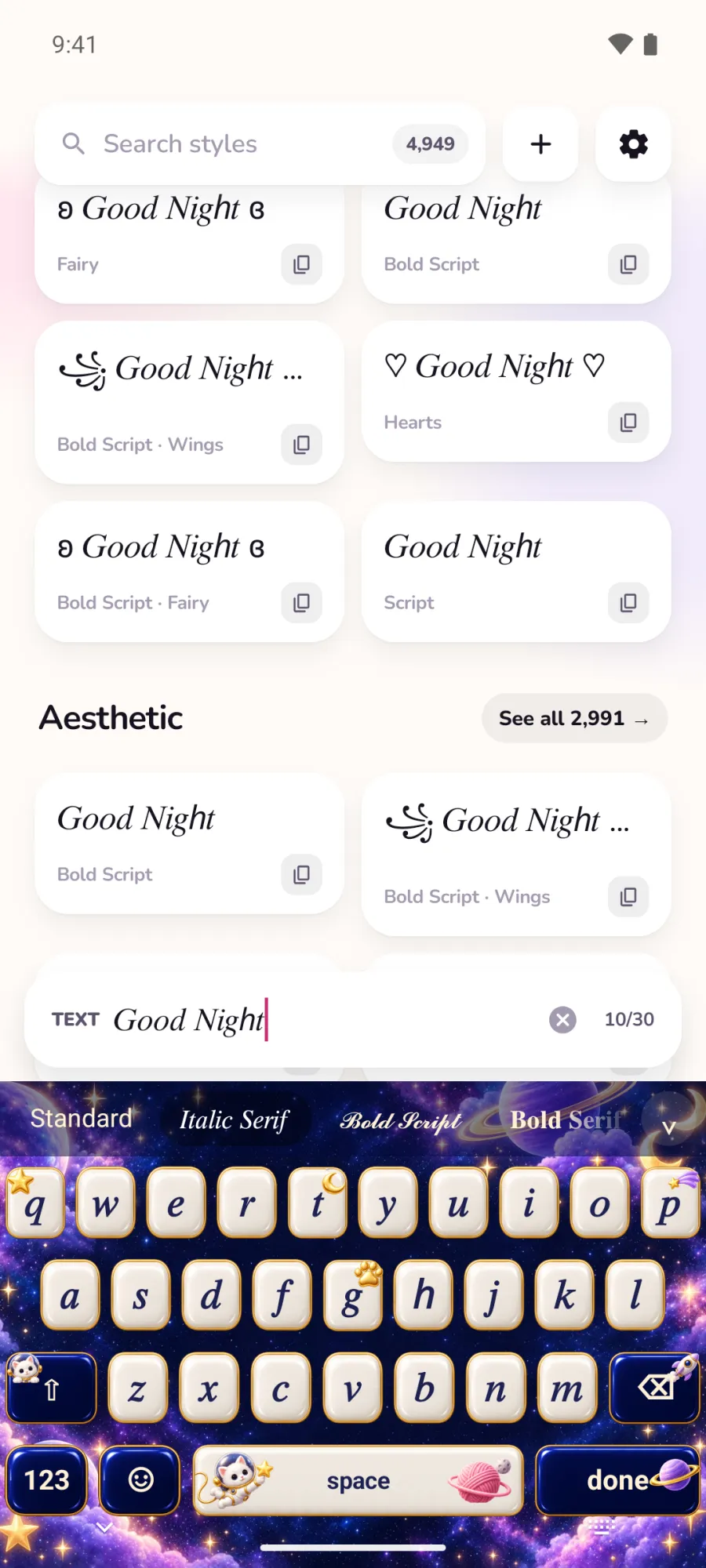
The Fancy Text Font Keyboard gives iPhone and Android users 81 custom fonts, 150 designer themes, and 304 kaomoji directly inside any app. It installs in two minutes, operates 100% offline without requiring iOS Full Access, and keeps every keystroke completely private with zero network tracking or server transmission.
Follow these 4 simple steps to enable custom keyboard fonts on iOS 15 or later. No font configuration profiles or computer connection required.
Download Fancy Text on your iPhone or iPad. The app bundles the complete keyboard extension natively.
Navigate to Settings › General › Keyboard › Keyboards, and tap "Add New Keyboard".
Under Third-Party Keyboards, tap Fancy Text. You do NOT need to toggle "Allow Full Access"—it works 100% offline.
Open Messages, Instagram, or WhatsApp. Tap the Globe (🌐) icon at bottom-left to switch to Fancy Text and start typing.
Compatible with Samsung Galaxy, Google Pixel, Xiaomi, OnePlus, and all Android 8.0+ smartphones.
Download Fancy Text on your Android phone or tablet from the Google Play Store.
Go to Settings › System › Languages & Input › On-screen keyboard › Manage on-screen keyboards.
Toggle the switch next to Fancy Text Keyboard to turn it on.
Tap any text box in TikTok or Discord. Tap the keyboard switch icon at the bottom-right corner of your screen.
Third-party keyboards often ask for full internet access to send keystrokes to remote servers. Fancy Text is built differently: it operates 100% offline with zero network connectivity.
The keyboard extension contains zero network networking code. It does not request internet access permissions and cannot transmit keystrokes to any external server.
Unlike competitors that require "Allow Full Access" to function, Fancy Text bundles all 81 fonts, 150 themes, and emoticons locally on-device.
All font substitutions and particle physics run inside isolated device RAM. No keystroke logging, no typing history caches, and no analytics beacons.
Because Fancy Text types universal Unicode characters, your styled fonts, kaomoji, and symbols work natively in every social, gaming, and messaging application without formatting errors.
Bio, Captions, Stories, DMs, Comments, Highlights
Display Name, Bio, Video Captions, Comments
About Status, Chat Messages, Group Names, Channels
Server Nicknames, Channel Names, Chat Markdown, Status
Display Name, Snaps, Stories, Chat, Bitmoji Bio
Direct Messages, Group Chat Names, Tapbacks
Profile Name, Bio, Posts, Threads, Replies
Display Name, In-Game Chat, Group Wall, Profile
Channel Name, Community Posts, Video Descriptions
Complete breakdown of operating system versions, security certifications, and supported platforms.
| iOS Compatibility | iOS 15.0 or later (compatible with iPhone, iPad, and iPod touch) |
|---|---|
| Android Compatibility | Android 8.0 (Oreo) or later on all mobile phones and tablets |
| Full Access Required? | No. The keyboard functions 100% offline without granting "Allow Full Access" on iOS |
| Network Requests | Zero network permissions; completely sandboxed on-device with zero keystroke tracking |
| Font Technology | Universal Unicode standard (recipients do not need the app installed to read text) |
| Catalogue Contents | 81 fonts, 150 themes, 24 key packs, 5 key sound profiles, 304 kaomoji, 1,191 symbols |
| Universal App Support | Instagram, TikTok, WhatsApp, Discord, Snapchat, iMessage, X, Threads, Roblox, YouTube |
| Setup Duration | Under 2 minutes via standard device settings |
Updated 31 October 2026
After installing Fancy Text from the App Store, open iOS Settings › General › Keyboard › Keyboards › Add New Keyboard, and tap "Fancy Text". Now open any app (like Messages or Instagram), tap any text field, and tap the Globe (🌐) icon to switch to Fancy Text.
No. Unlike many third-party keyboards, Fancy Text operates 100% offline and does NOT require you to enable "Allow Full Access". All 81 fonts, 150 themes, 304 kaomoji, and 1,191 symbols are bundled directly inside the keyboard extension.
Apple shows a standard security disclaimer whenever you view the Full Access toggle for any third-party keyboard. Because Fancy Text works completely without Full Access, you can leave that toggle switched OFF with complete peace of mind.
For your security, iOS and Android automatically force the system default keyboard inside secure password and credit card fields. This is an OS-level security feature designed to protect your sensitive credentials.
Yes. Every font style produced by Fancy Text uses standard Unicode characters. Because Unicode is an international computing standard built into every phone, tablet, and PC, your text renders correctly on all devices without any extra apps.
Type in 81 fonts, 150 themes, and 304 kaomoji directly inside Instagram, TikTok, WhatsApp, and Discord.